 Dandelion Creations
SchoolAbility · Aftercare Records
Know who fetched every child, every day.
The teacher on duty signs children in and out on a phone at the safety gate, and only people on a child's list can fetch them. Parents register with a link and get their own private page for messages, notes and their statement. It runs from your own Google Sheet, in Afrikaans and English.
R1,499 once-off. No subscription and no fee per child. A free setup call is included if you want a hand switching it on.
Made for aftercare centres and school aftercare for Grade 1 to 7, with a principal, a few teachers and a safety gate.
A paper register can't tell you who's still at the gate.
Pickup changes come in on WhatsApp, the register sits in a file, and someone has to remember Mia's peanut allergy and Liam's birthday. SchoolAbility puts it all on the phone the teacher on duty is already holding.
Owned, not rented
Pay once. No monthly fee and no price per child. It runs in your own Google account and keeps working.
The children's details stay with you
Names, ID numbers, allergies and fees sit in your own spreadsheet. We never see them. Parents give POPIA consent on the registration form.
Every change has a reason
Fixing a sign-out time or removing a charge needs a reason, and the log keeps who did what and when.
One afternoon, in one minute
Mom sends a pickup message. The teacher at the gate sees it, marks it as read and sees it's Mia's birthday. Dad fetches Mia, and the principal sees the whole day on one page.
Demo school. All names are made up.
Three people, three views
Each person gets their own link and only sees what they need.
The principal
Opens a private link on a computer or phone.
- Today's page with who is here, messages and birthdays
- Children, contacts and who may fetch
- Staff, groups, fees and settings
The teacher on duty
Taps their name on the staff link and types a PIN.
- The gate register for every group
- Allergies and messages on each child's card
- A homework list per grade, marked done and checked
The parents
Each child gets a private link, and the parent types their own PIN.
- Send the school a message for a day
- Homework, notes and the register
- Their statement and how to pay
How it works
From ordering to your first afternoon in three steps.
Get your sheet and key
Order and pay, and we email you the sheet link and your activation key.
Switch it on once
Add your school's name, closing time, groups, teachers and fees. Or book a free setup call and we do it together on a screen share, up to 20 minutes.
Send parents the link
Parents fill in the registration form on their phone. You check each one, approve it, and the child shows up at the gate.
What is inside
Registration, the gate, notes, messages and fees, in one place.
- A registration form parents fill inChild, medical details, parents, an emergency contact and the people who may fetch. With POPIA consent and photo permission.
- The safety gate registerSign children in and out with one tap. The time comes from the sheet, not from someone's pen.
- Only the list can fetchThe teacher picks who is at the gate from the child's list. For anyone else, the app says not to let the child go and shows the parents' numbers.
- Allergies on every cardAllergies and medication show in red on the child's card at the gate and on the principal's page.
- Messages from parentsPickup changes, absent days and other notes for a day. The teacher marks them as seen, and the parent can see that.
- Birthday remindersA birthday tag at the gate on the day, and this week's birthdays on the principal's page.
- Homework for every gradeThe teacher copies the homework once for the day or the week, then marks each child not done, done or checked. Tests show with their date. Progress and AceIQ notes too.
- Groups that fit your centreStarts with Gr 1, Gr 2, Gr 3 and Gr 4-7. Change them to match your teachers.
- Monthly and late pickup feesYou set the monthly fee and the late fee rules. Late pickups are worked out from the gate times.
- Statements and paymentsBill the month in one click, record payments, and each parent sees their own statement.
- Afrikaans and EnglishEvery screen, for the principal, the teachers and the parents. Each person picks their own language.
- A log of every changeFixes, removed charges and approvals all go in the Log sheet with a name and a reason.
See it in action
The principal's Today page, the gate and the homework list on a teacher's phone, and the parent page.
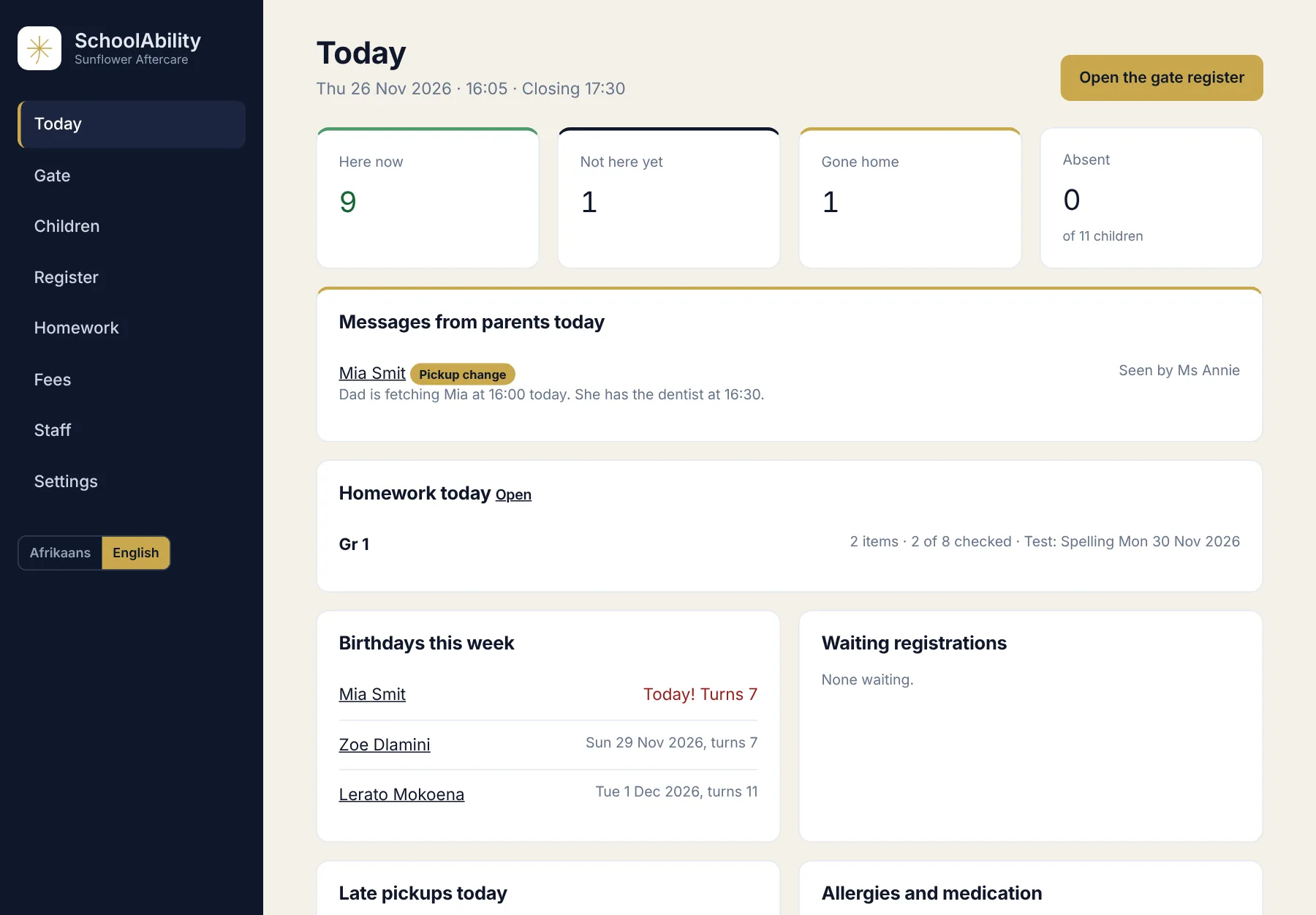
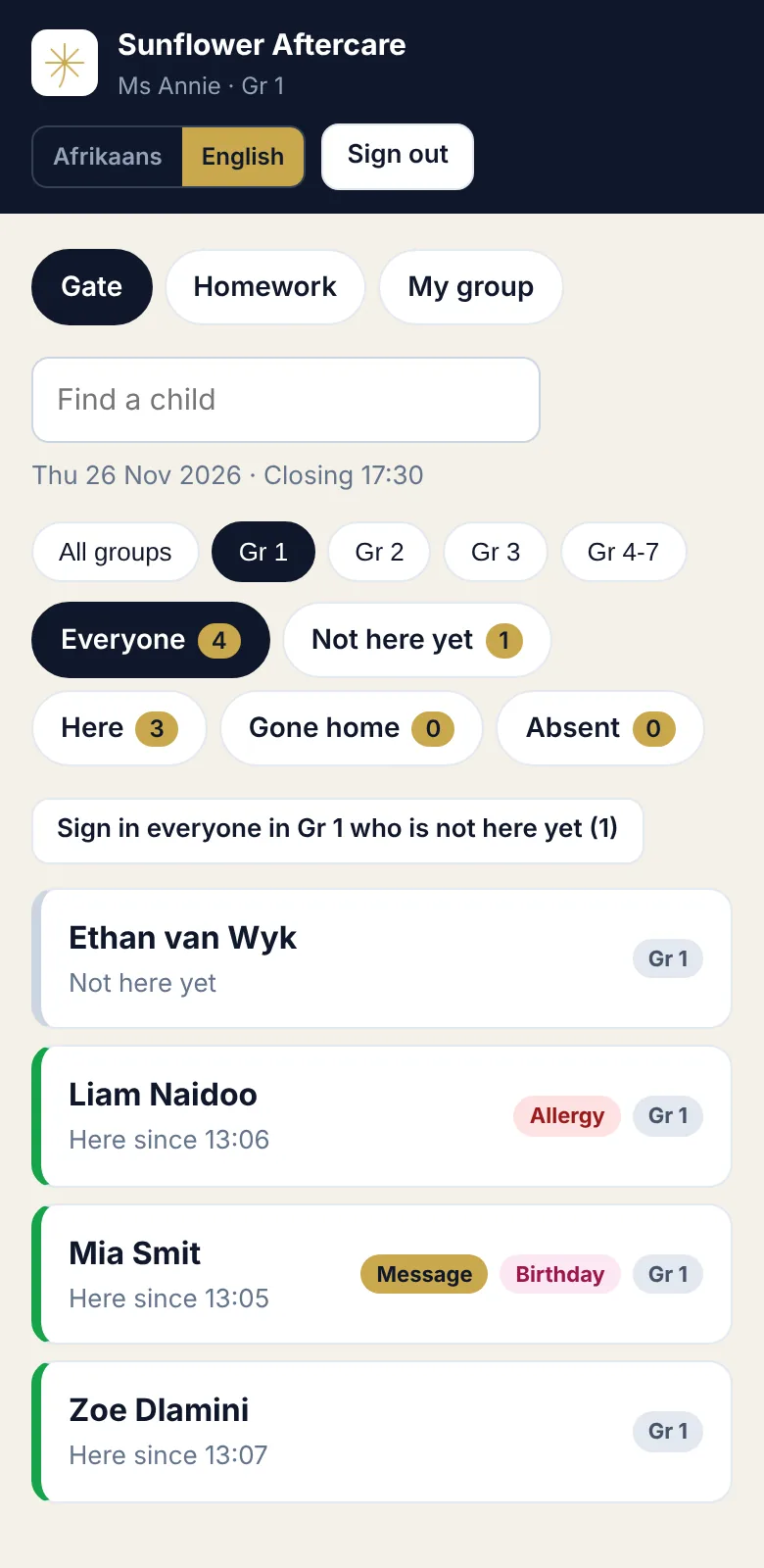
The gate register
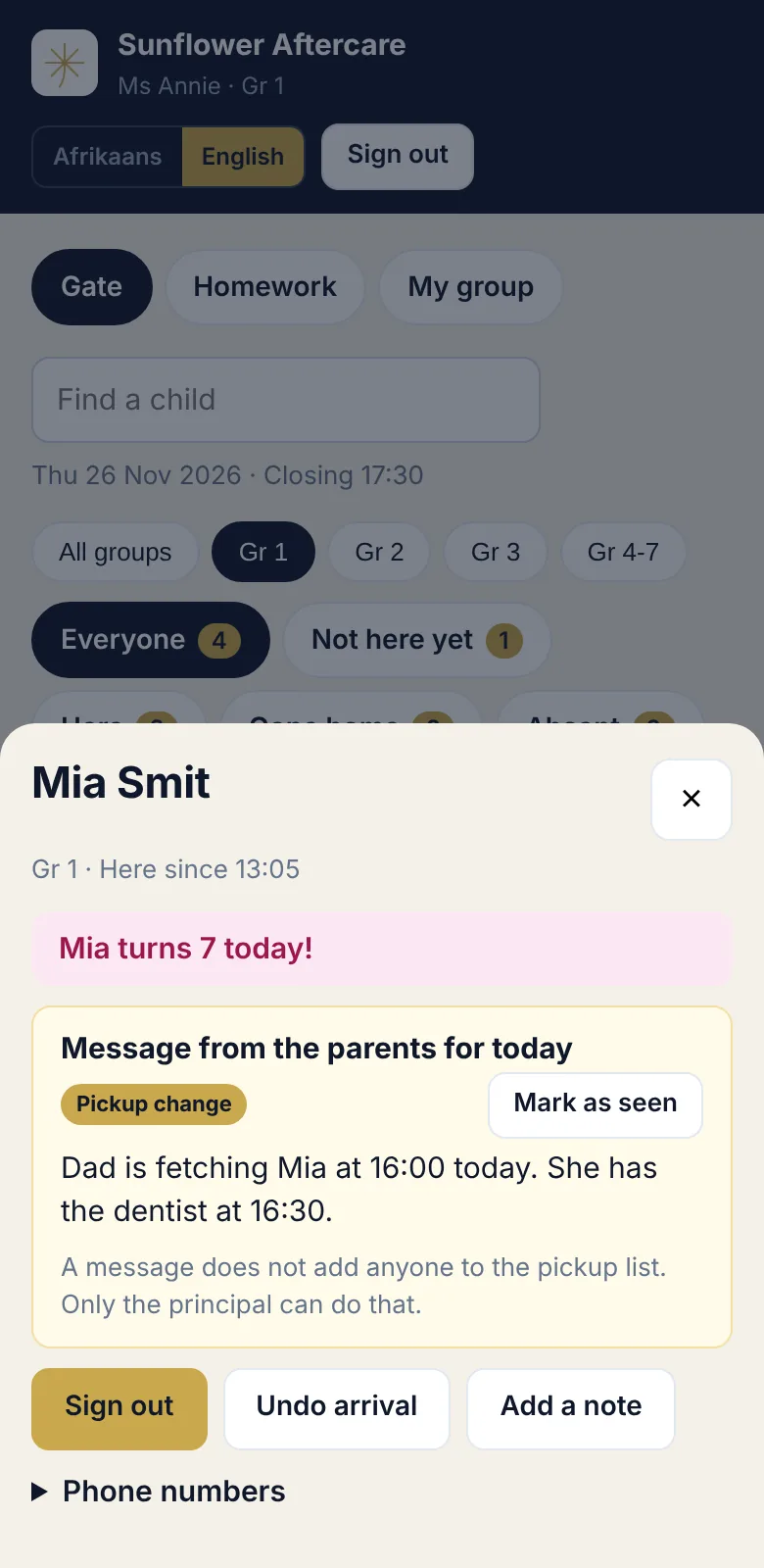
A message and a birthday on Mia's card
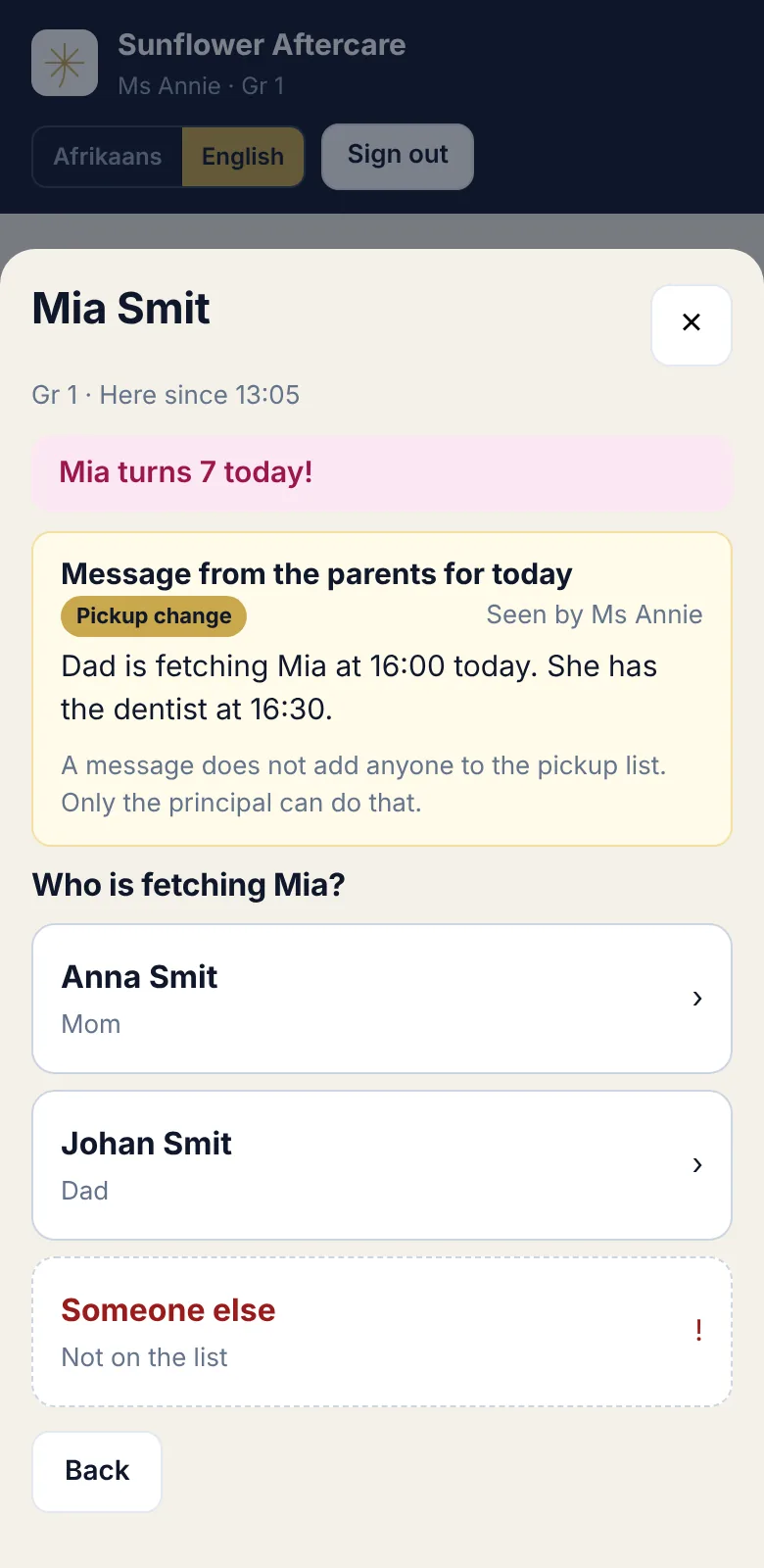
Only the people on her list
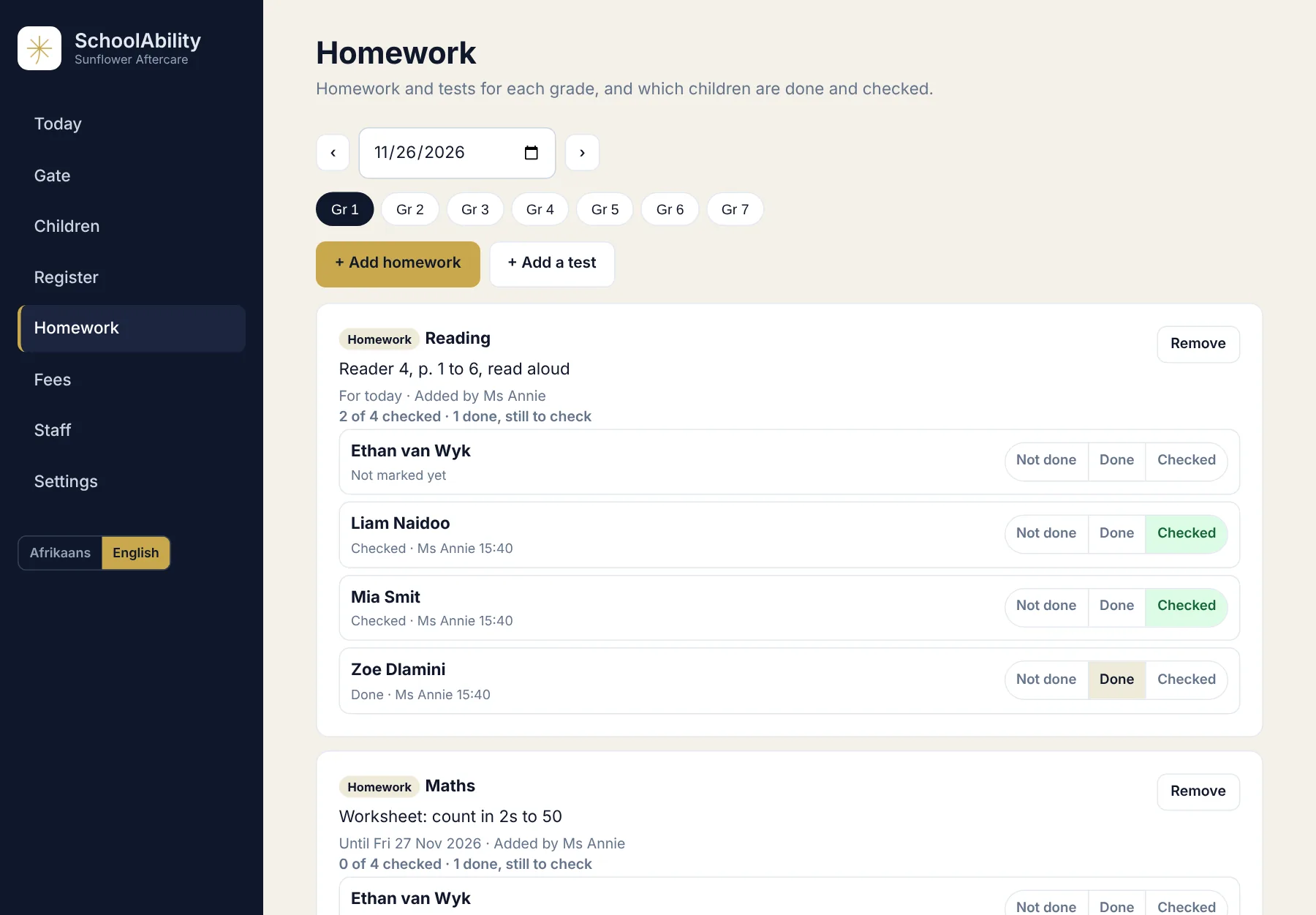
Homework for each grade
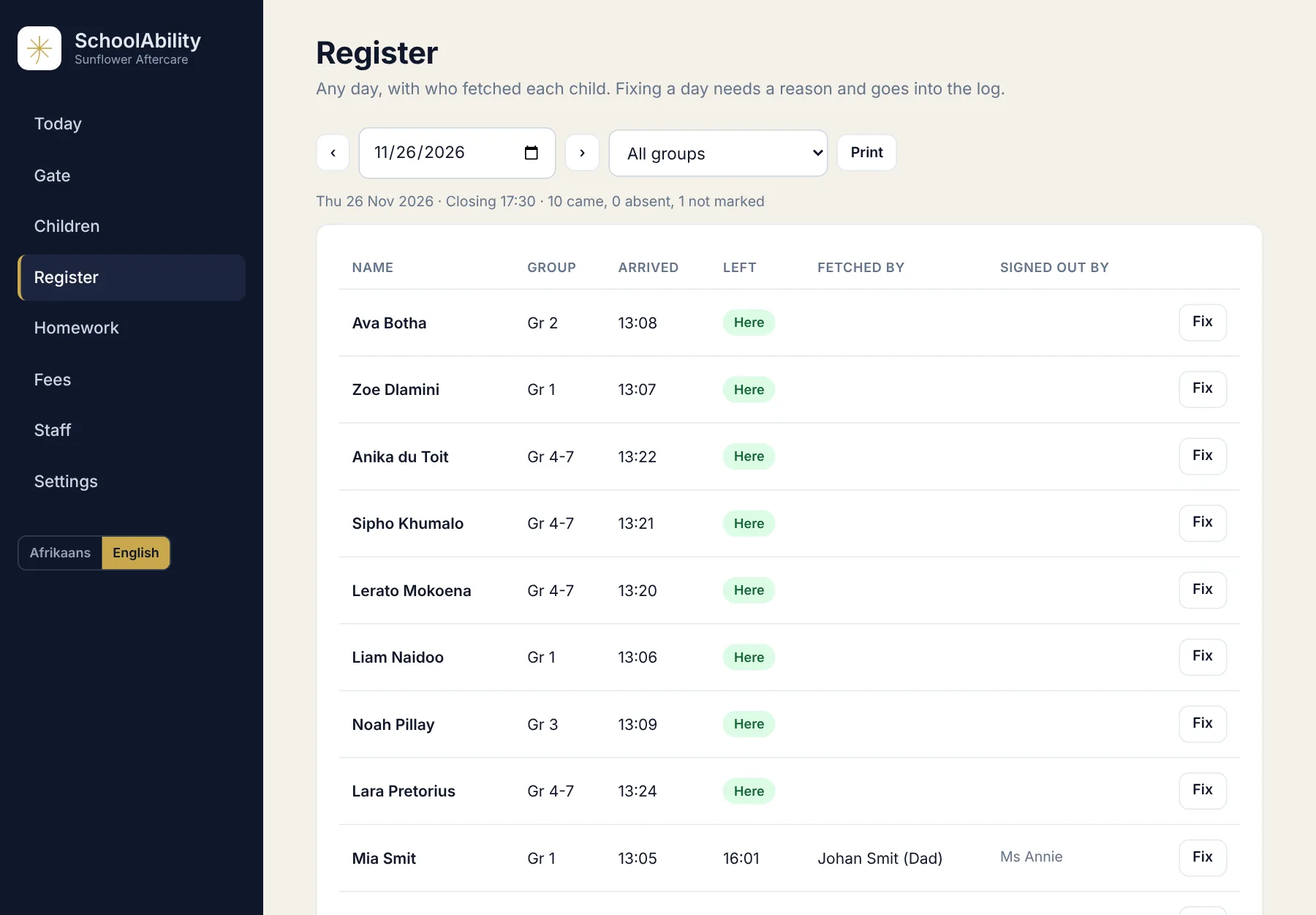
The day's register
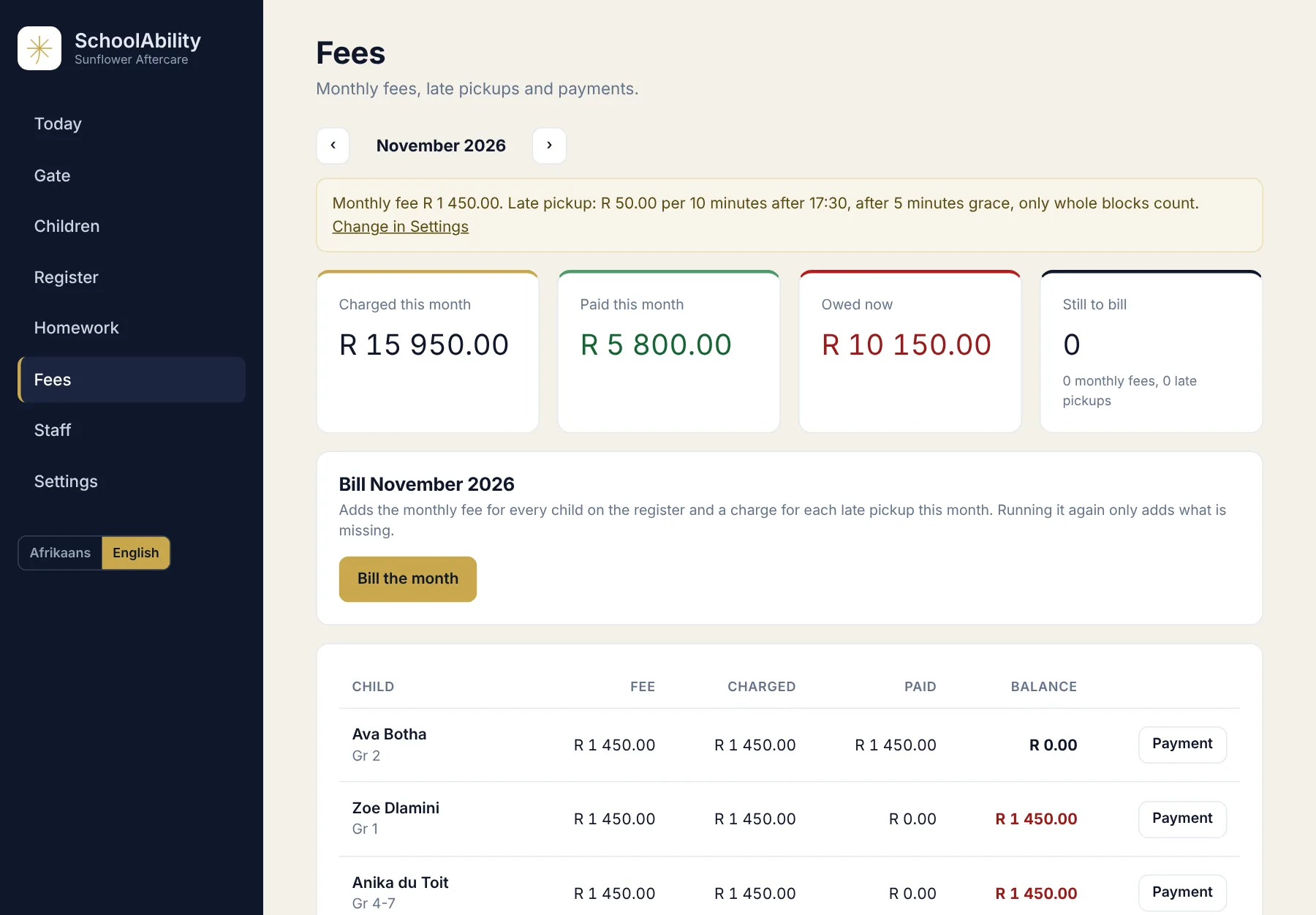
Fees for the month
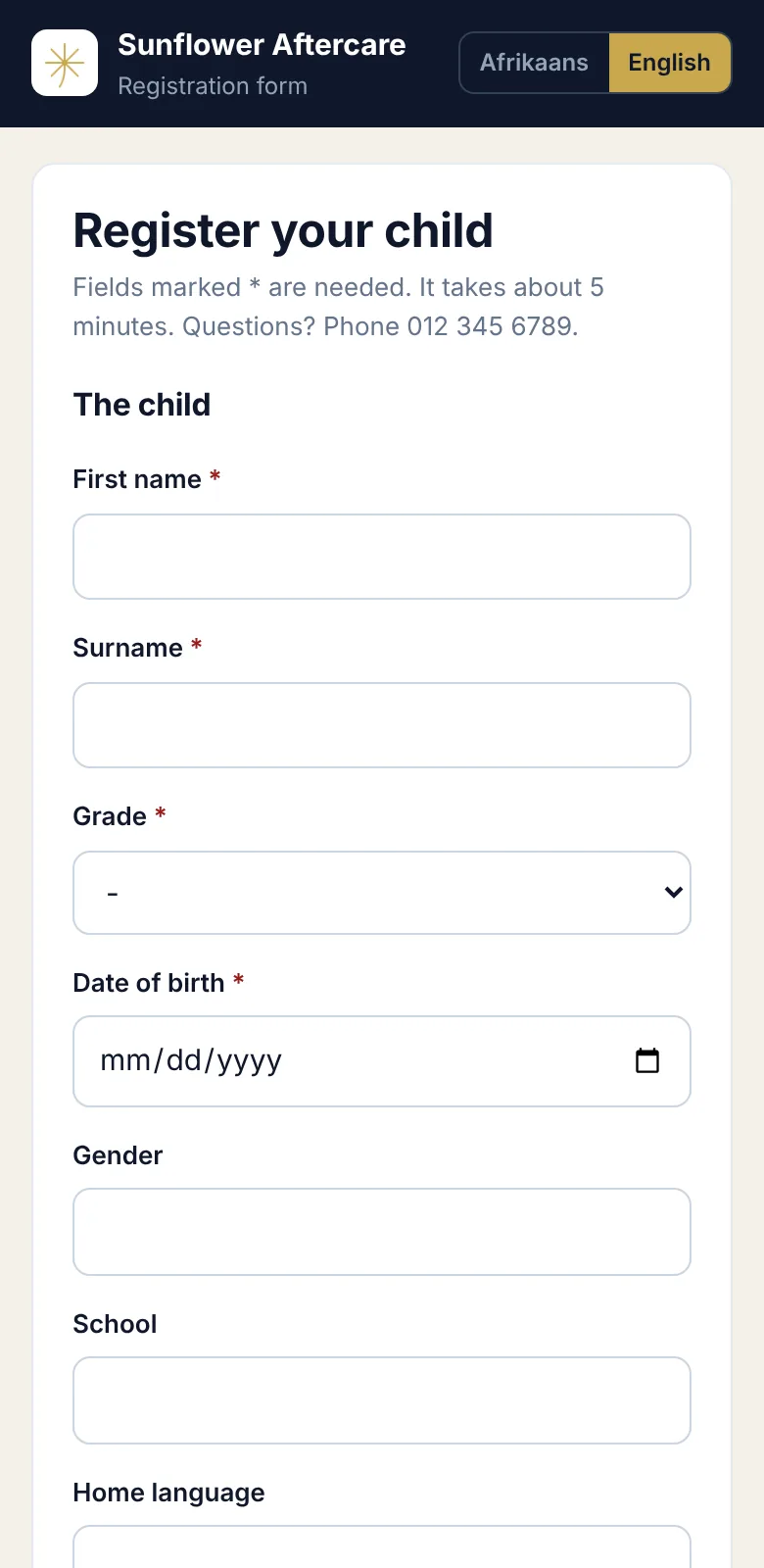
The registration form
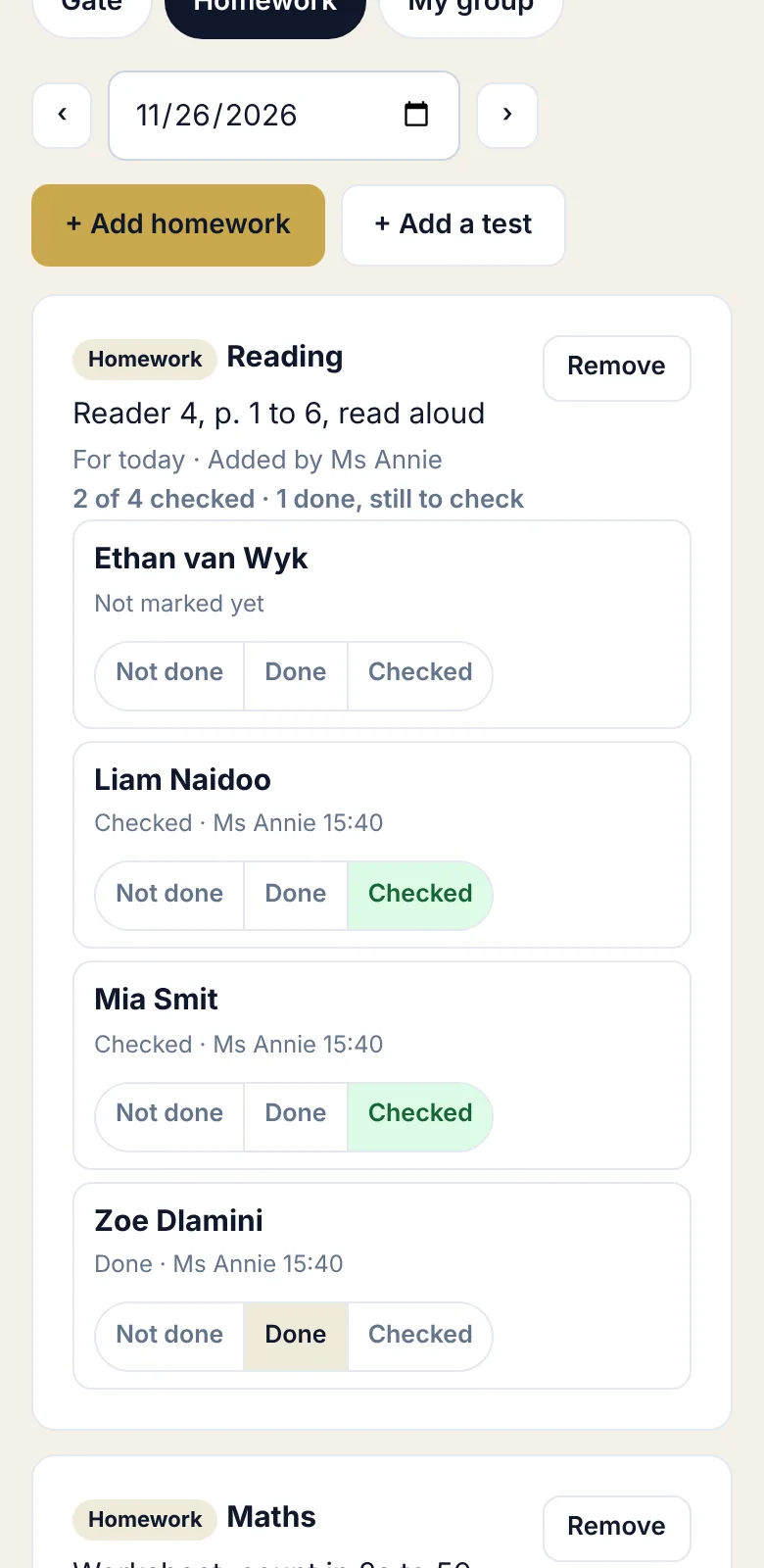
Homework, ticked per child
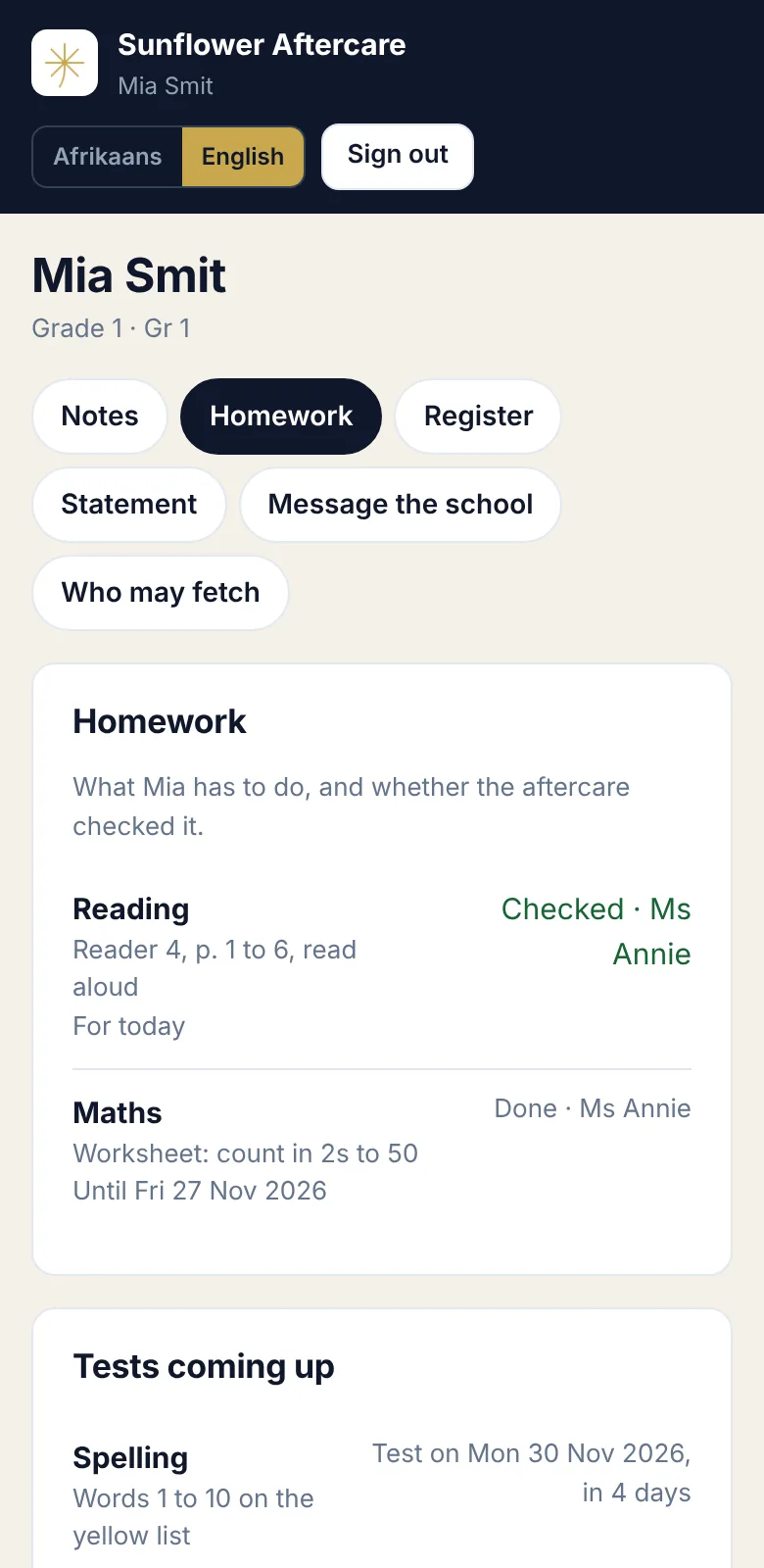
Mom sees what was checked
Screens show a made-up demo school.
A paper register or SchoolAbility?
Paper works until a parent's WhatsApp gets lost or someone new turns up at the gate.
| What you get | Paper and WhatsApp | SchoolAbility |
|---|---|---|
| Who may fetch each child | In a file in the office | On the child's card at the gate |
| The real sign-out time | What someone wrote down | From the sheet's clock |
| Pickup changes from parents | On one teacher's phone | On the child's card, marked as seen |
| Homework | A signature in a book in the school bag | Done and checked, per child, on the parent's page |
| Allergies | On a list on the wall | In red on every card |
| Late pickup fees | You do the sum | Worked out from the gate times |
| Parents' statements | Typed by hand | On their own page |
| Price | Your time | R1,499 once-off |
What it does not do
So you know before you buy.
No automatic SMS or WhatsApp
It doesn't send messages to parents by itself. Parents open their own page to see notes and their statement. You can send each parent their link on WhatsApp with one tap.
No payments or debit orders
It keeps the fees, payments and statements. It doesn't take money or connect to your bank. Parents pay the way they do now.
No ID or face check
The teacher picks the person from the child's list and checks them like they do today. A parent's message never adds a new person to the list. Only the principal can.
Made for Grade 1 to 7
It is built around aftercare for school-going children. Baby and toddler routines like nappies, sleep and feeding times are not in it, and it doesn't do school marks or report cards.
R1,499 once. Yours to keep.
No monthly fee, no price per child, no renewal.
SchoolAbility: Aftercare Records
- The SchoolAbility sheet and your activation key
- Links for the principal, the staff, registration and every parent
- Afrikaans and English
- Short setup guide
- A free setup call, up to 20 minutes, on a screen share
Not happy? We help first with a setup call, then refund you if it still isn't right. Read the refund policy.
Questions
Short answers.
Is it a subscription?
No. You pay R1,499 once. There is no monthly fee, no fee per child and nothing to renew.
Do the teachers need to install an app?
No. The staff link opens in the phone's browser. Each teacher taps their name and types their own 4 digit PIN. Parents use their own link the same way.
What happens if someone not on the list comes to fetch a child?
They're not on the child's list, so the teacher taps Someone else. The app says not to let the child go and shows the parents' numbers to phone. Only the principal can add a person to the list.
Can a parent change the pickup person with a message?
They can tell the school, and the teacher sees it on the child's card. The message doesn't add anyone to the list. If it's someone new, the principal adds them first.
Does it keep test marks?
No. Teachers add the test date and what to study, so parents see it coming. The school marks the work and keeps the marks. The aftercare makes sure the homework got done.
Can we use it in Afrikaans?
Yes. Every screen is in Afrikaans and English. You choose the school's default, and each teacher and parent can switch with one tap.
Can we change the fees and groups?
Yes. The principal fills in the monthly fee, the late pickup fee and the closing time, and can add or rename groups. Nothing is billed until you set the amounts.
What about POPIA?
The registration form asks the parent for consent before you keep their child's details, and the details stay in your own Google account. You are still responsible for how your centre uses them, so keep the sheet's sharing to the people who need it.
Where is the data stored?
In your own Google Sheet, in your own Google account. We never see the children, parents or fees. When you activate, your key and the email of your Google account are checked with us once, and after that SchoolAbility keeps working on its own.
Do I need to know how to code?
No. Switching it on takes a handful of clicks and the guide shows each one. You can also book a free setup call and we do it together.
What if it isn't right for us?
We help first with a free setup call, then refund you if it still isn't right. The refund policy has the details.
Every child home with the right person.
Switch SchoolAbility on once and keep the register, the pickup lists, the messages and the fees in a system you own.
Order SchoolAbility for R1,499