 Dandelion Creations
Profitability · Income & Expenses
Know what you actually made this month, and what to set aside for VAT.
Your bank statement goes in as a CSV file, sorts itself into categories, and comes out as a profit and loss you can hand to your accountant. It runs in your own Google Sheet, opened from one private link. You pay once.
R799 once-off. No subscription. 72 hour demo included. Make your own copy of the demo sheet, then start the 72 hour demo with the key INC-DEMO-2026. A free setup call is included if you want a hand switching it on.
Best for freelancers and small businesses that want clear income, expenses and profit without paying a bookkeeper to type it in. It is not a SARS filing tool and it does not send invoices.
Most owners find out how the month went in January.
Receipts in a shoebox, a bank statement nobody has sorted, and a VAT return that needs it all by Friday. Profitability keeps the running picture, so the answer is already there when you ask.
Owned, not rented
No monthly fee and no price per user. It runs in your own Google account, so it keeps working.
Your data stays yours
Transactions, clients and receipts sit in your own spreadsheet. We never see them. The only thing checked with us is your activation key and the Google email that activates it, once.
Built for South Africa
Rand amounts, a financial year that ends in February, 24 South African starter categories, and VAT worked out only if you are VAT registered.
How it works
From ordering to your first profit and loss in three steps.
Get your sheet and key
Order, pay, and we email you the sheet link and your activation key.
Switch it on once
A step by step guide takes you through setup and deploying it from your own Google account. Book a free setup call and we do it together on a screen share, up to 20 minutes.
Import and look
Open your private link, upload a statement, check the preview and import. The dashboard fills in straight away.
What is inside
The parts of bookkeeping that a small business actually needs every week.
- Bank statement importUpload a CSV from your bank. The columns are guessed, you check them, preview every line, and then import. Dates without a year, like 26 Sep, are read too.
- Duplicates are skippedImport the same statement twice and nothing is counted twice. Every import is logged and can be undone.
- Clean names"POS Purchase Pick N Pay Asap" becomes "Pick N Pay Asap". The bank's own wording is kept in the notes.
- Rules that learnChange a category once and the words that identify the shop are saved as a rule, so next month's statement sorts itself.
- Moves between your accountsA transfer from one of your accounts to another is filed as a transfer, so it never counts as income or spending.
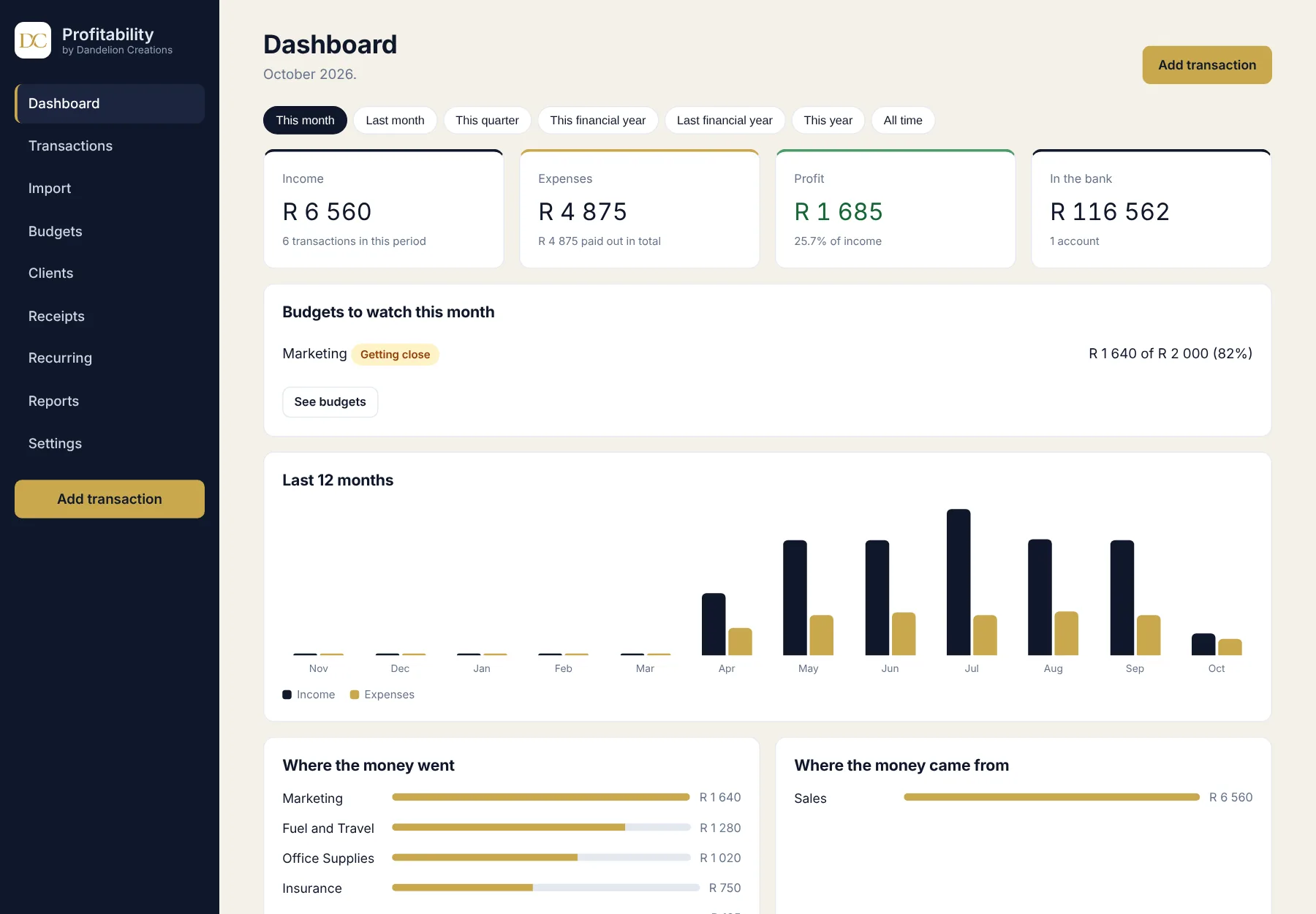
- DashboardIncome, expenses, profit and margin for this month, last month, this quarter, your financial year or any dates you pick, with a 12 month trend and where the money went.
- VAT summaryIf you are VAT registered, VAT is worked out from the amount you paid or received. The summary helps you prepare a VAT201. It does not file anything.
- ReportsProfit and loss with a month by month table, VAT summary, profit by client and project, and a CSV for your accountant. Print any of them.
- BudgetsA monthly limit on a spending category, with a warning level. The dashboard shows the ones to watch.
- Clients and projectsSee income, expenses and profit for each client and each project, so you know which work pays.
- ReceiptsRecord a receipt and link it to the matching payment. You can see which deductible payments still have no receipt.
- Recurring entriesRent, subscriptions or a retainer. They show up when due and you press Record. Nothing is recorded without that press.
- Optional AI suggestionsAdd your own Groq key and Profitability can suggest categories for lines it could not sort. Only the description and whether money went in or out are sent, with long numbers hidden. You tick what you want and nothing changes until you apply.
- Try it with sample dataOne button fills an empty book with six months of made-up figures, and another removes exactly those rows again.
See it in action
The dashboard you open on the first of the month, the list of transactions, and a profit and loss.
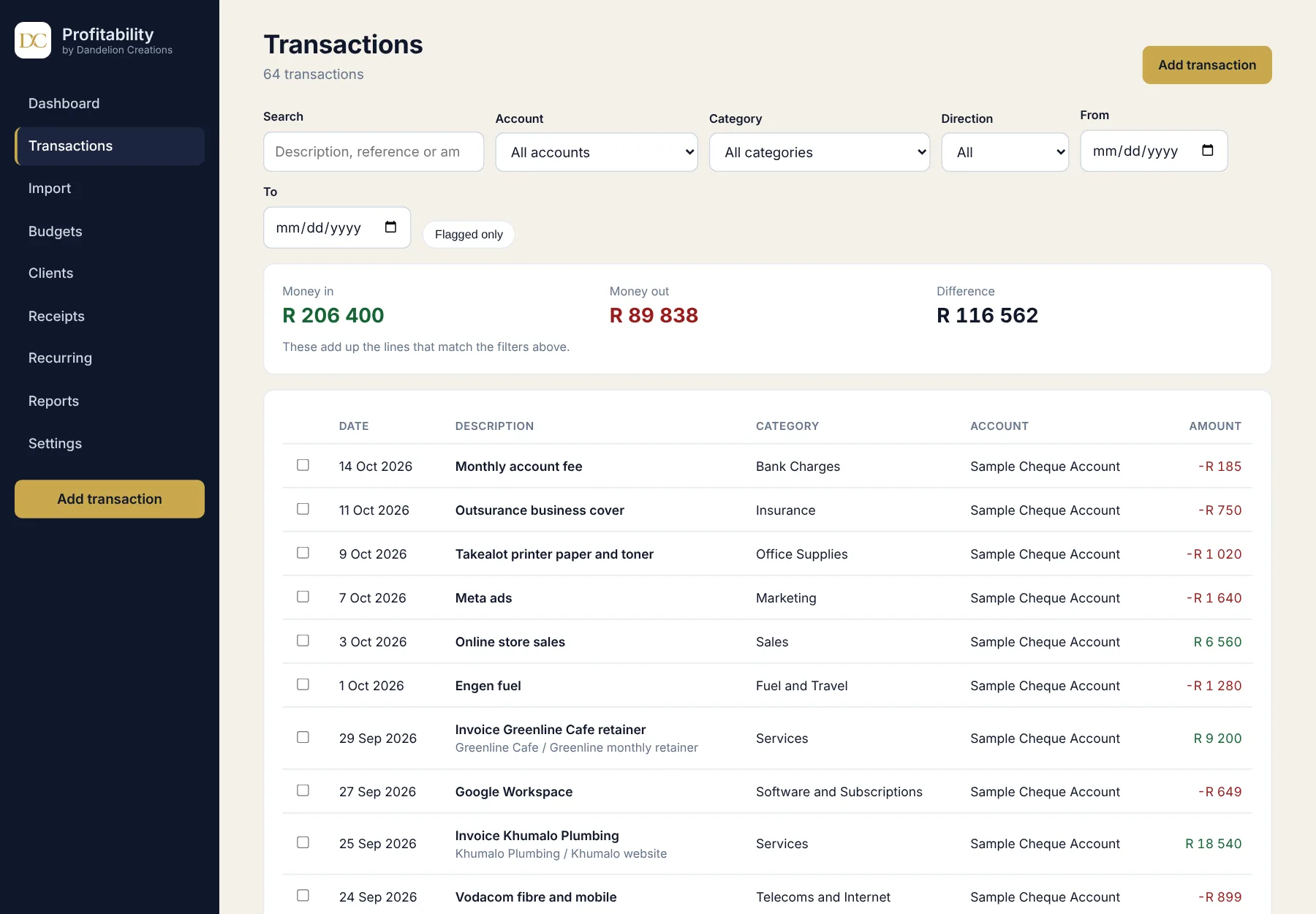
Every transaction, with category and account
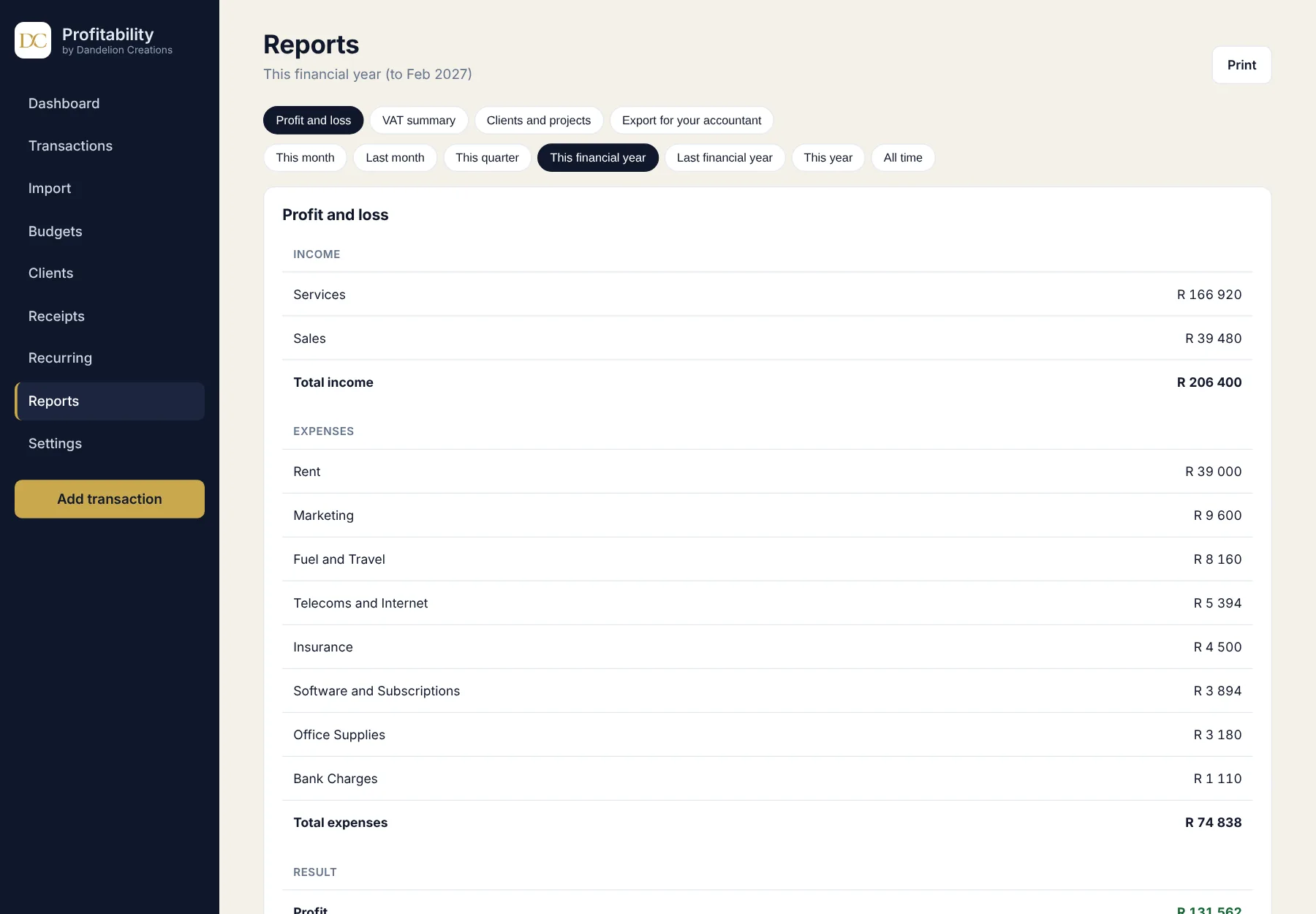
Profit and loss for your financial year
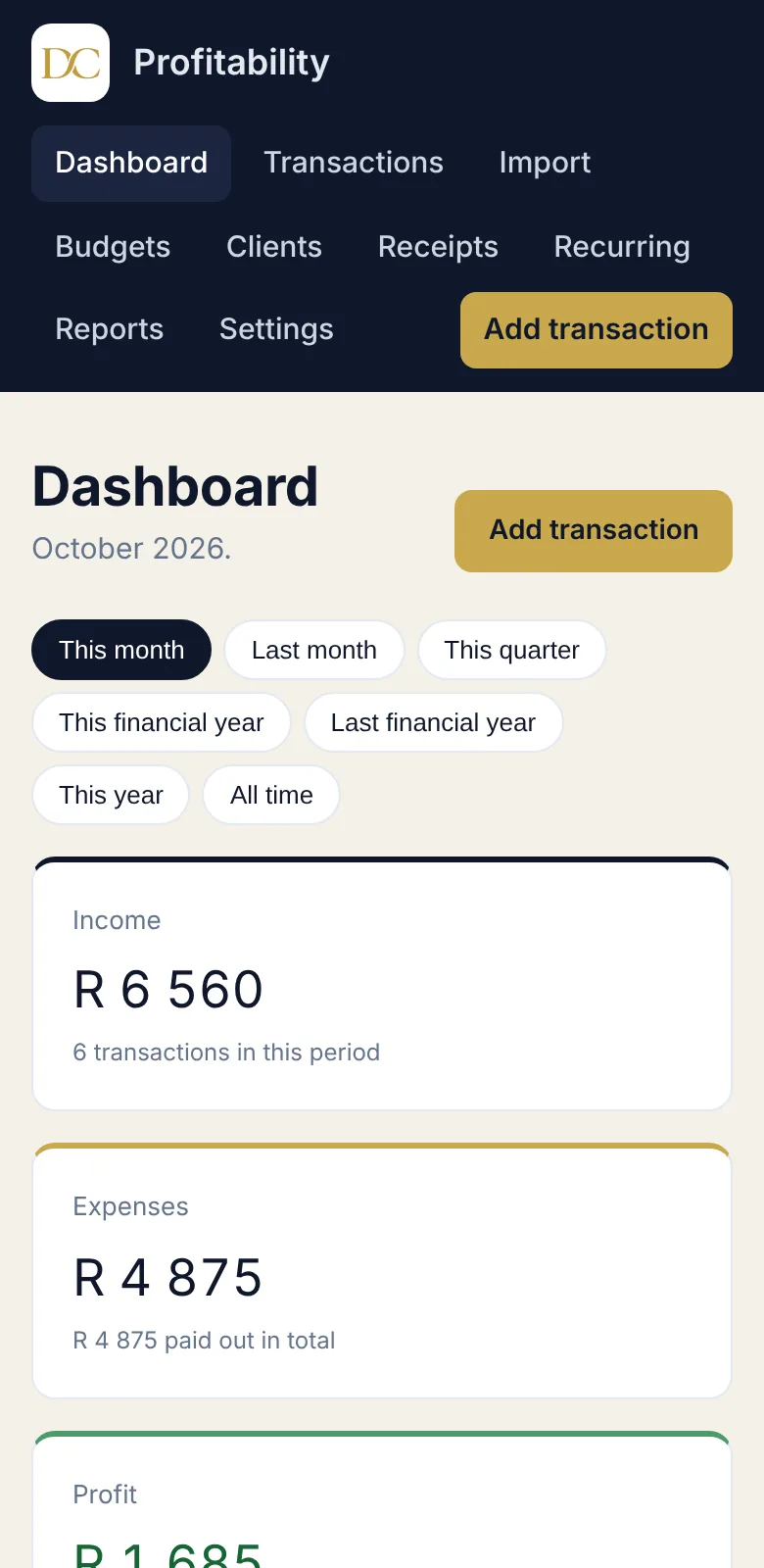
The same link on a phone
Screens show made-up demo data.
A spreadsheet or Profitability?
A plain spreadsheet works until the statements pile up. Profitability is still your spreadsheet, with the checks added.
| What you get | A plain income sheet | Profitability |
|---|---|---|
| Income and expenses per month | Yes | Yes |
| Bank statement import with a preview | Copy and paste | Yes |
| The same statement never counted twice | No | Yes |
| Categories that sort themselves | No | Yes |
| Transfers kept out of profit | By hand | Yes |
| VAT summary | By hand | Yes |
| Profit by client and project | No | Yes |
| Price | Your time | R799 once-off |
What it does not do
So you know before you buy.
Not a SARS filing tool
The VAT figures are a summary to help you prepare a VAT201. They are not a submission, and they do not replace your accountant.
No live bank feed
You download a CSV from your bank and import it. Profitability never connects to your bank account.
One owner, no roles
Everyone with your private link sees and can change everything. There are no personal logins or permission levels.
No invoicing, no forecast
It records money that has moved. It does not send invoices (use PayAbility for that) and it does not forecast cash flow.
R799 once. Yours to keep.
No monthly fee, no price per user, no renewal.
Profitability: Income & Expenses
- The Profitability sheet and your activation key
- 72 hour demo before you commit
- Step by step setup guide
- A free setup call, up to 20 minutes, on a screen share
- Bank statement import, reports and a CSV for your accountant
Not happy? We help first with a setup call, then refund you if it still is not right. Read the refund policy.
Questions
Short answers.
Can I try it first?
Yes. Make your own copy of the demo sheet, set it up with the guide, and start the 72 hour demo with the key INC-DEMO-2026. Every feature is switched on, and a button loads six months of made-up figures so you can look around. The demo can be started once on each Google account. When it ends, your data stays in the sheet and the app asks for an activation key.
Is it a subscription?
No. You pay R799 once. There is no monthly fee and nothing to renew.
Do I need to know how to code?
No. Switching it on is a handful of clicks and the guide shows each one. You can also book a free setup call and we do it together.
Where is my data stored?
In your own Google Sheet, in your own Google account. We never see your transactions, clients or receipts. When you activate, your key and the email of your Google account are checked with us once, and after that Profitability keeps working on its own.
Which banks does the import work with?
Any bank that lets you download a statement as a CSV file. It guesses the date, description and amount columns and you confirm them before anything is saved. It has been built around FNB and Capitec wording, and other banks work as long as the file has those columns.
What if I import the same statement twice?
Lines already in the sheet are skipped, so nothing is counted twice. Every import is logged, and you can undo one if something looked wrong.
Am I VAT registered?
You tell Profitability once in Settings. If you are not VAT registered, VAT is left out completely. If you are, it is worked out from the amount and shown in a summary you can use to prepare your VAT201.
What does the AI part send, and is it needed?
It is optional and off until you add your own Groq key. Only the description and whether money went in or out are sent, with long numbers hidden. Amounts and bank details never leave your sheet. You tick the suggestions you want, and nothing changes until you apply them.
Does it work on my phone?
Yes, in your phone's browser, from the same private link. It is not an app from an app store.
What if it is not right for me?
We help first with a free setup call, then refund you if it still is not right. The refund policy has the details.
Know your profit before the month ends.
Switch Profitability on once and keep your income and expenses in a system you own.
Order Profitability for R799