 Dandelion Creations
Availability · Stock & Supplier Pro
Know what you have, what is running low and what is on its way.
Stock levels, suppliers and purchase orders in your own Google Sheet, opened from one private link. You pay once and there is no monthly fee.
R499 once-off. No subscription. 72 hour demo included. Make your own copy of the demo sheet, then start the 72 hour demo with the key STK-DEMO-2026. A free setup call is included if you want a hand switching it on.
Best for small businesses that buy stock from suppliers, like makers, shops and workshops. It does not do invoicing, sales or barcode scanning.
Running out is expensive. So is ordering too much.
Most small businesses find out they are short when a customer is waiting. Availability keeps a running count and tells you when to order, before it becomes a problem.
Owned, not rented
No monthly fee and no price per user. It runs in your own Google account, so it keeps working.
Your data stays yours
Items, suppliers and orders sit in your own spreadsheet. We never see them. The only thing checked with us is your activation key and the Google email that activates it, once.
A trail for every change
Stock only changes through a logged movement, with the date, the reason and who did it. When the count looks wrong, you can see why.
How it works
From ordering to your first purchase order in three steps.
Get your sheet and key
Order, pay, and we email you the sheet link and your activation key.
Switch it on once
A step by step guide takes you through setup and deploying it from your own Google account. Book a free setup call and we do it together on a screen share, up to 20 minutes.
Open your private link
Bookmark one link. Add your suppliers and your items, and the reorder list builds itself from there.
What is inside
The parts of stock control that small businesses actually use.
- ItemsCost, selling price, unit, category, supplier, location and barcode or SKU. Quantities can have decimals, so kilograms and litres work.
- Reorder levelsSet a level on each item. When stock reaches it, the item shows as Low, or Out at zero.
- Reorder listWorked out fresh every time you open it. Items already on order show as Ordered, so you do not order twice.
- Draft orders in one clickTick what you need and Availability makes one draft order for each supplier, with a suggested quantity you can change.
- Purchase ordersDraft, sent, confirmed, part delivered, received or cancelled. VAT and payment terms come from your settings.
- Print or email to the supplierPrint or save as PDF, or email the order from your own Gmail with the PDF attached. It only goes to the address saved on the supplier.
- Part deliveriesBook in what arrived. Stock goes up straight away, and you cannot book in more than is still to come.
- Late ordersOrders past their expected date are flagged on the dashboard until they arrive.
- Stock takeCount the shelves. Availability works out the differences, corrects the stock and shows what the difference is worth at cost.
- Suppliers and ratingsContact details, payment terms and a rating out of 5 for delivery, quality and communication.
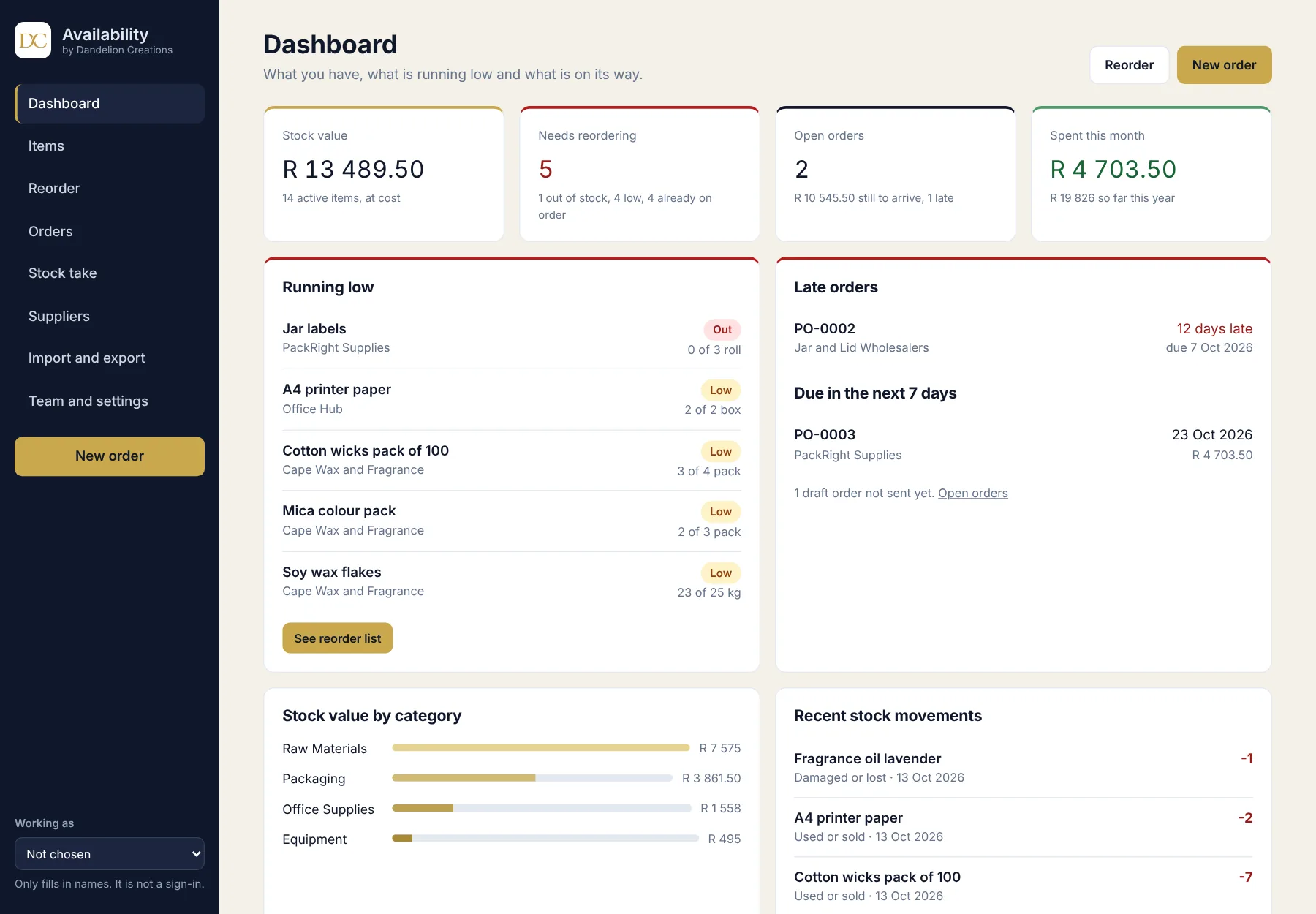
- DashboardStock value, what needs reordering, open and late orders, spend this month and this year, and stock value by category.
- Import and exportBring suppliers and items across from a CSV file and check a preview first. Download items, suppliers, orders and the stock log as CSV any time.
See it in action
The dashboard you open in the morning, the list of what to order, and a purchase order part way through a delivery.
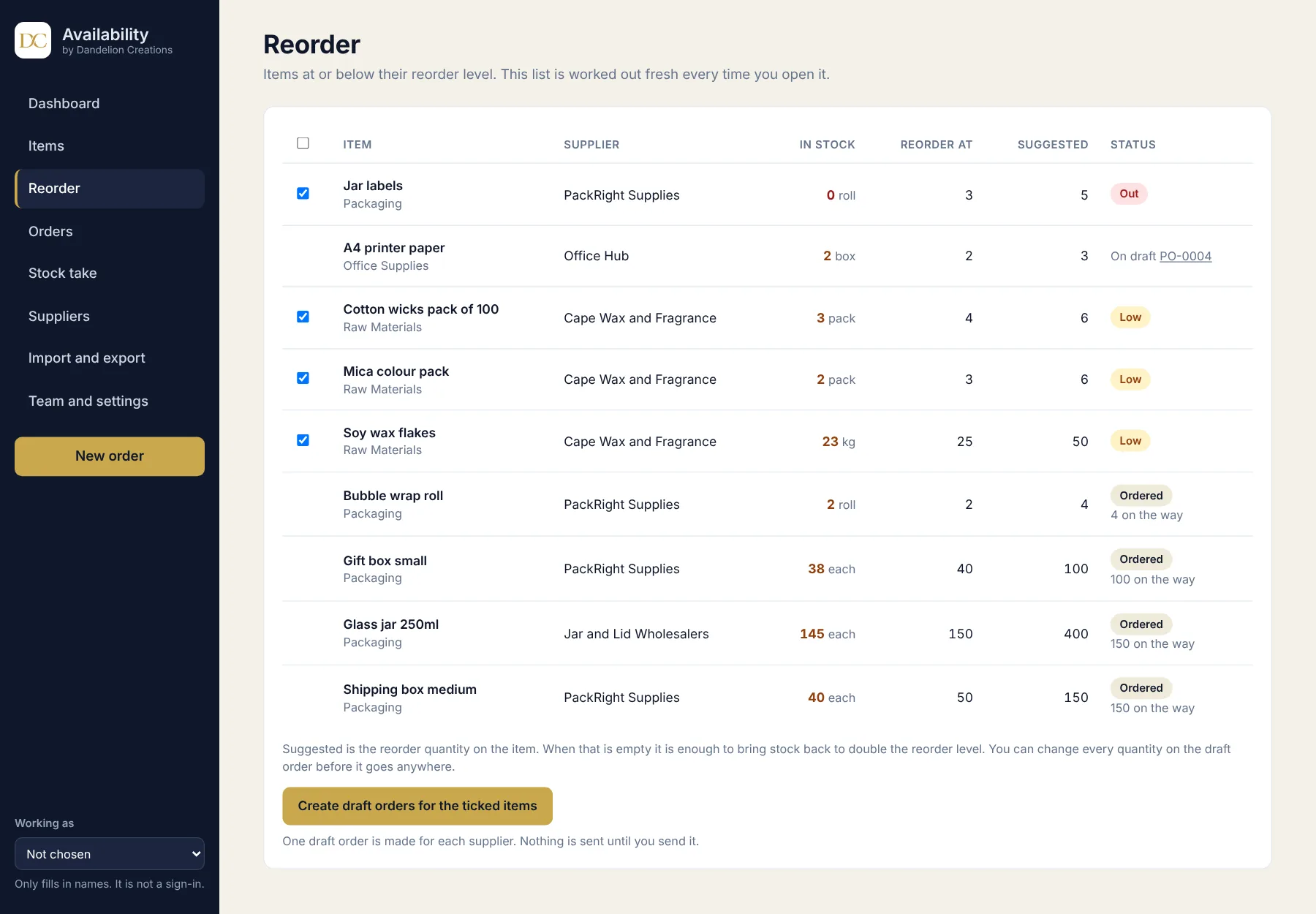
The reorder list
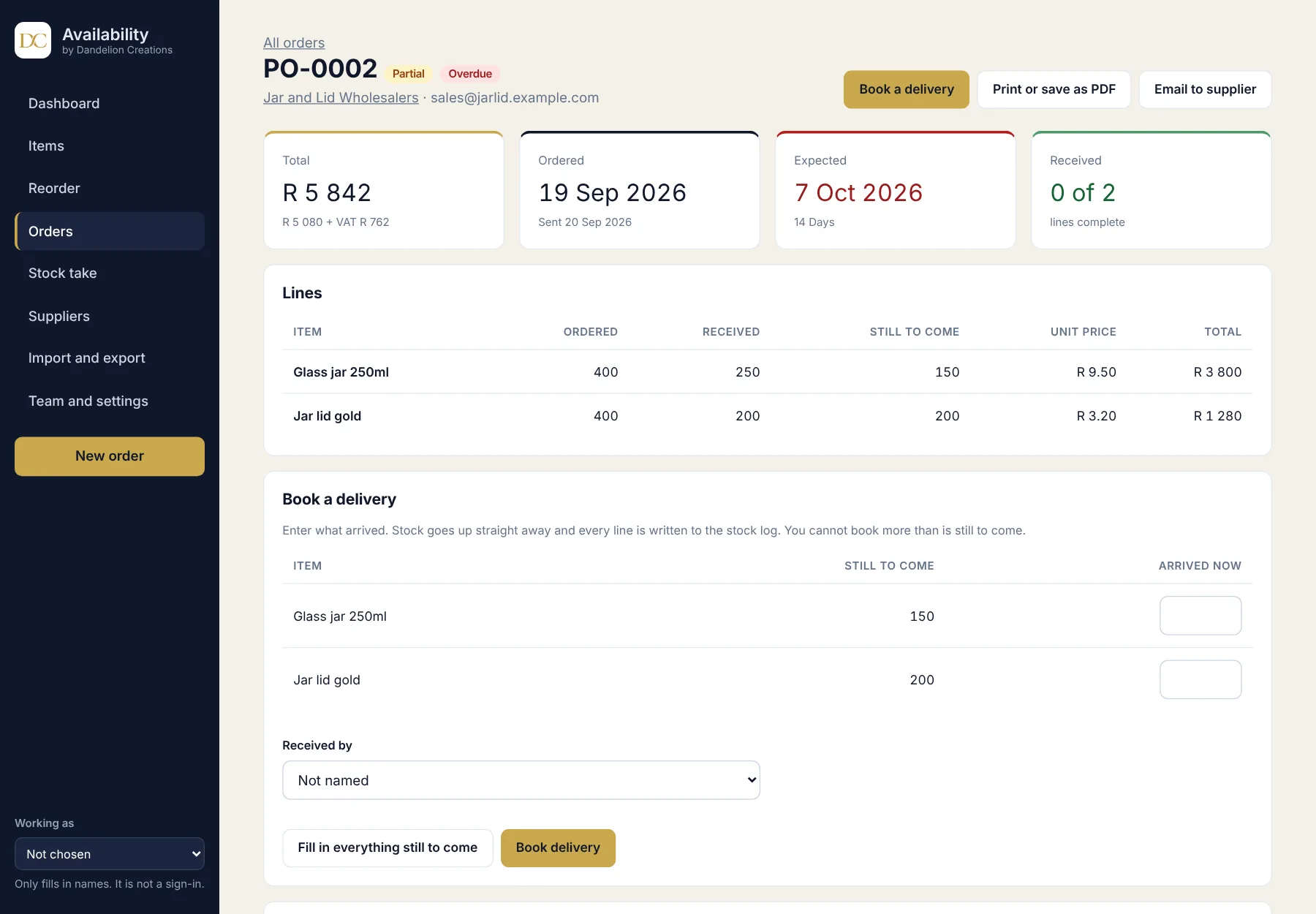
A purchase order, with a delivery being booked in
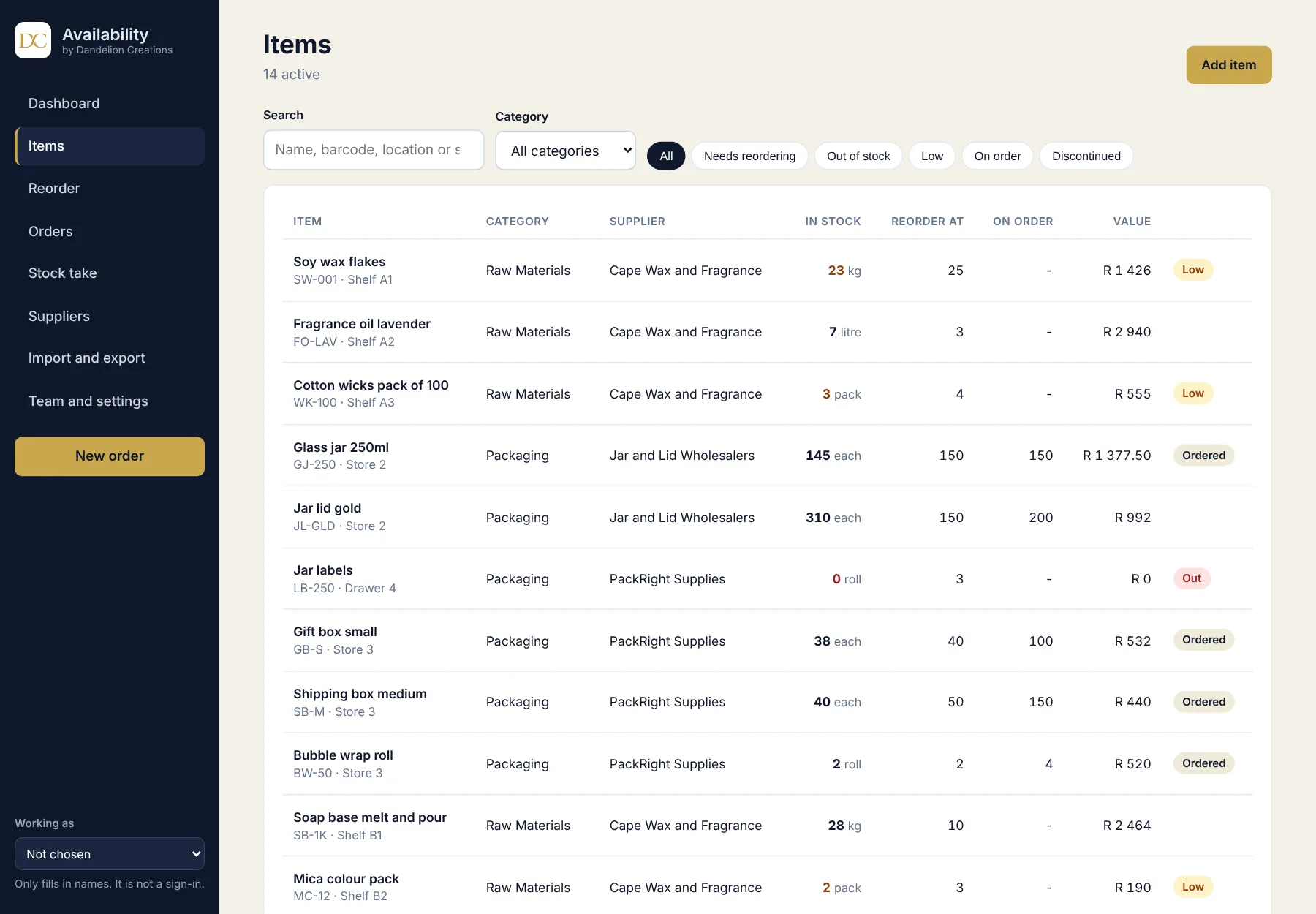
Your items, with stock and status
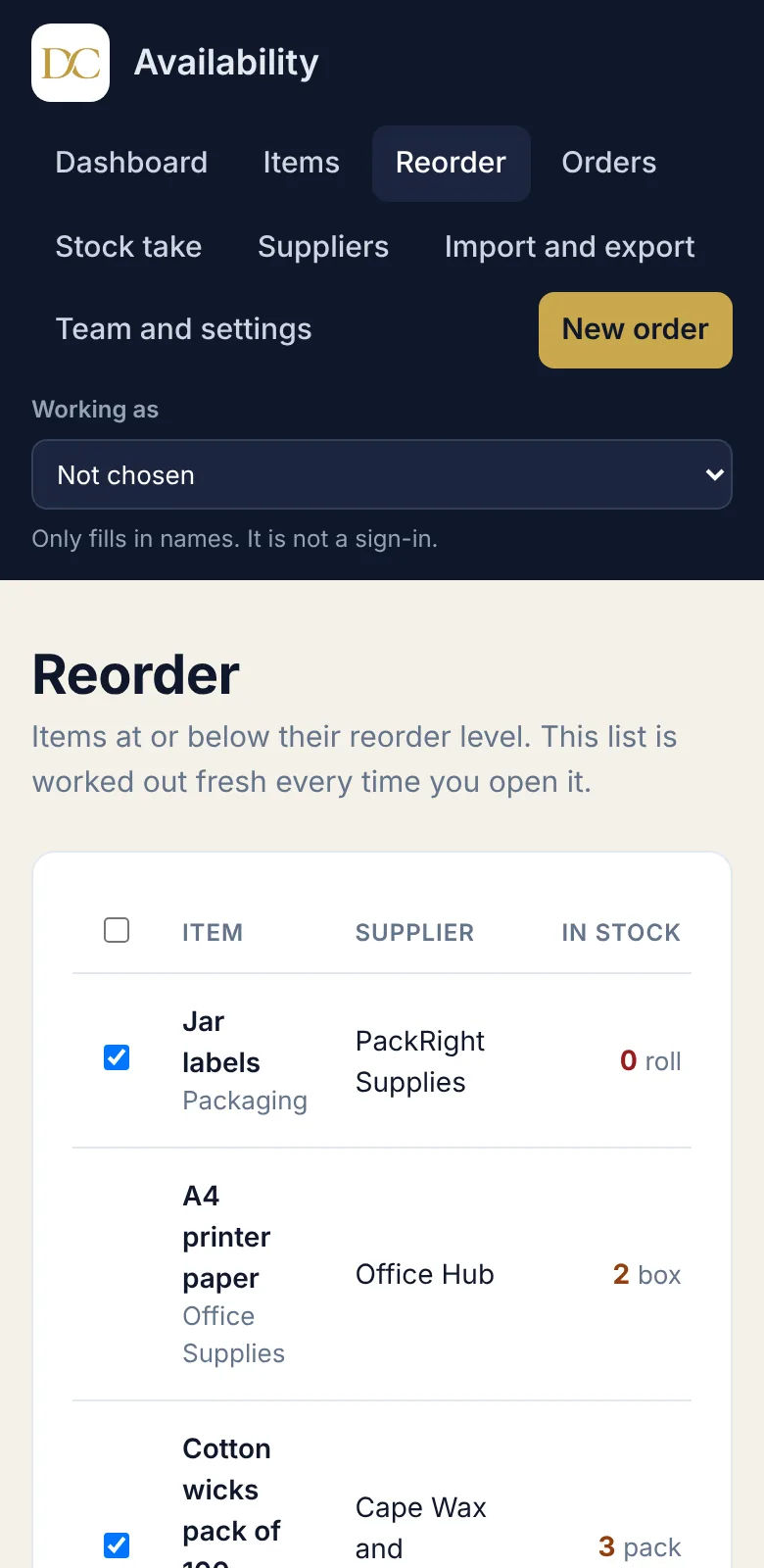
The same link on a phone
Screens show made-up demo data.
A stock spreadsheet or Availability?
A plain spreadsheet works until a few people start changing it. Availability is still your spreadsheet, with the checks added.
| What you get | A plain stock sheet | Availability |
|---|---|---|
| Stock levels per item | Yes | Yes |
| A reason and a date for every change | Only if you type it | Always |
| Stock that cannot go below zero | No | Yes |
| A reorder list that updates itself | No | Yes |
| Purchase orders to print or email | No | Yes |
| Part deliveries booked against an order | No | Yes |
| Stock take with the difference valued | No | Yes |
| Price | Your time | R499 once-off |
What it does not do
So you know before you buy.
No personal logins
Everyone with your private link sees and can change everything, including supplier details. Names only fill in who counted or who received a delivery. It cannot hide anything from someone or prove who did it. If you need that, this is not the right tool.
No barcode scanning
The barcode or SKU is a field you can type or paste and search. There is no scanner support.
One place, simple stock
It does not do several warehouses, batches or expiry dates. Each item has one stock number.
No sales or invoicing
Availability does not take orders from your customers or send invoices. Use PayAbility for that. It sends an email only when you click Email to supplier, never on its own.
R499 once. Yours to keep.
No monthly fee, no price per user, no renewal.
Availability: Stock & Supplier Pro
- The Availability sheet and your activation key
- 72 hour demo before you commit
- Step by step setup guide
- A free setup call, up to 20 minutes, on a screen share
- Import from a CSV file, and export any time
Not happy? We help first with a setup call, then refund you if it still is not right. Read the refund policy.
Questions
Short answers.
Can I try it first?
Yes. Make your own copy of the demo sheet, set it up with the guide, and start the 72 hour demo with the key STK-DEMO-2026. Every feature is switched on, and a button loads a made-up candle and soap business so you can look around. The demo can be started once on each sheet. When it ends, your data stays in the sheet and the app asks for an activation key.
Is it a subscription?
No. You pay R499 once. There is no monthly fee and nothing to renew.
Do I need to know how to code?
No. Switching it on is a handful of clicks and the guide shows each one. You can also book a free setup call and we do it together.
Where is my data stored?
In your own Google Sheet, in your own Google account. We never see your items, suppliers or orders. When you activate, your key and the email of your Google account are checked with us once, and after that Availability keeps working on its own.
How does the email to the supplier work?
When you click Email to supplier, Availability sends the order from your own Gmail account, with the PDF attached, to the address saved on that supplier. It never sends anything on its own. Google limits how many emails an account can send in a day, and the app tells you if you have reached it. The first time, Google asks you to allow sending email.
Can my whole team use it?
Yes. Everyone opens the same private link, and each person picks their name from your team list on their own device. That only fills in who counted stock or received a delivery. It is not a sign-in, so everyone sees and can change everything.
Can I bring my existing stock list across?
Yes. Import your suppliers and items from a CSV file. You see a preview first, duplicates are skipped, and the opening stock is written to the stock log.
Can I change stock by typing into the sheet?
Please do not. Use the app, so every change gets a reason and a date in the stock log and the numbers stay in step.
Does it work on my phone?
Yes, in your phone's browser, from the same private link. It is not an app from an app store.
What if it is not right for me?
We help first with a free setup call, then refund you if it still is not right. The refund policy has the details.
Order before you run out.
Switch Availability on once and keep your stock and suppliers in a system you own.
Order Availability for R499